Account Settings on MyInvoiceOnline.co.uk
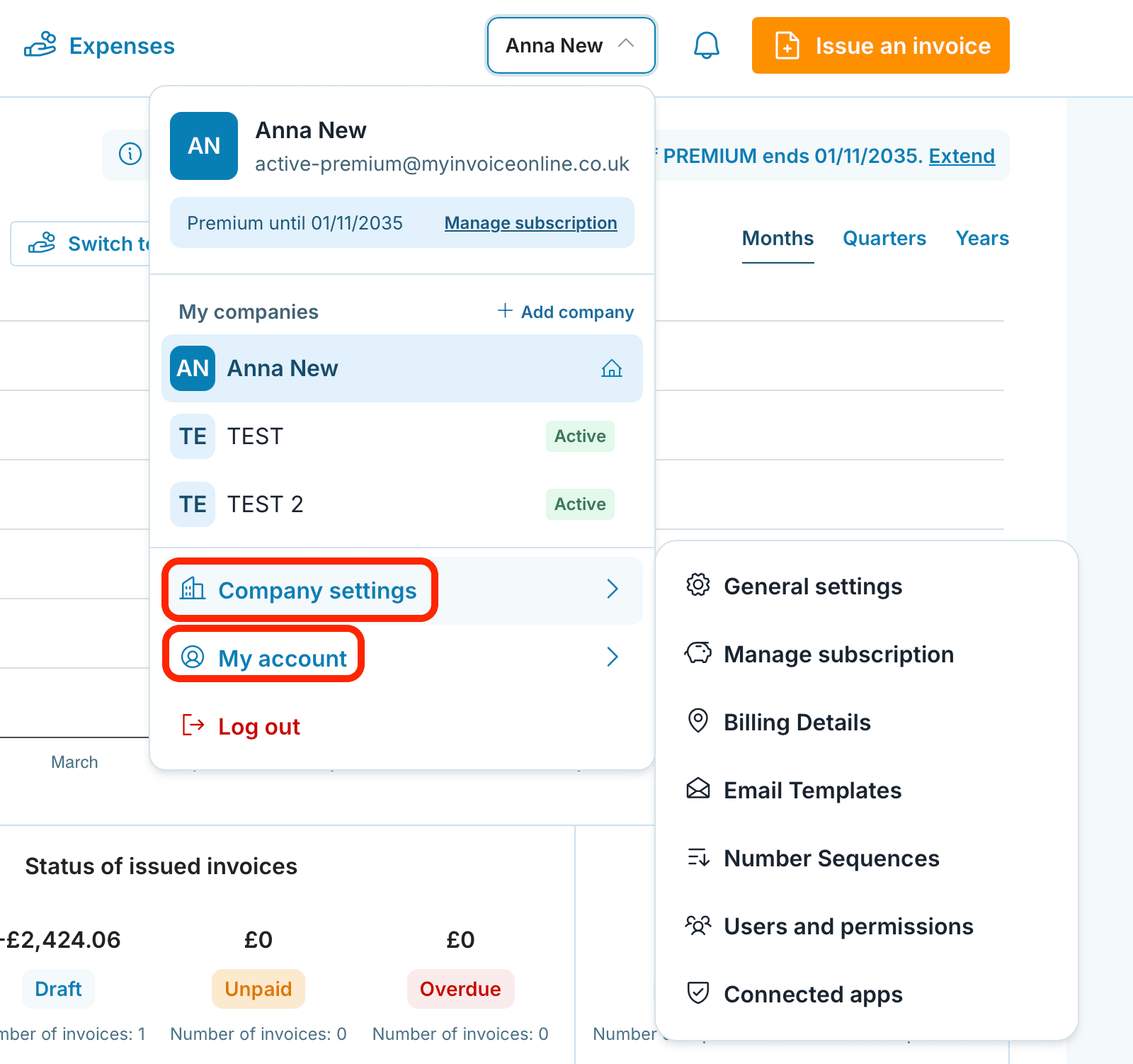
Whether you’re a freelancer or run a small business, MyInvoiceOnline.co.uk simplifies your invoicing workflow. You’ll find all settings in the business menu: click the name of your business at the top right. The menu has two settings entries, and each covers something different:
Company settings - subscription, general settings, email templates and number sequences. These apply only to the business you currently have selected.
My account - password change and two-factor authentication. These apply to all your businesses.

Running several businesses?
Company settings are saved separately for each business. Before you change anything, switch to the right business at the top right. Its name is shown in the header of every settings window. To learn how to add and switch businesses, see Multiple Businesses Under One Login.
Subscription
Each business has its own plan. You’ll find it in Company settings → Manage subscription, or via the link below your current plan right in the business menu. Need to extend or upgrade your plan? You can do it right here. We’ll present you with available subscription options so you can select the plan that best suits your business needs.
General settings
Open Company settings → General settings. Below the window title you’ll see the name of the business whose settings you’re changing. Here you can tailor how you work with your invoices and other features:
Invoice Statuses: In this section, you can activate or deactivate the Invoice statuses feature. You can use four built-in statuses: Draft, Unpaid, Overdue, and Paid. These help you track invoice progress and payment status.
Line suggestions: Save time during invoice creation. As you enter line items, the system will suggest products or services you’ve used before, speeding up your workflow.
Hide brand in the invoice footer
Base currency: If you issue invoices in a currency other than GBP, you can set your default here. All reports and financial summaries will then display correctly using your chosen currency.

On mobile, you’ll find the general settings in the slide-out menu, in the same Company settings section.

Want to dive deeper into how these features work? We recommend checking out our help articles for tips on using invoice statuses, item suggestions, and financial reporting.
Email templates
In Company settings → Email templates you can communicate professionally with your clients using customisable email templates. These templates are easy to edit and adapt to your brand’s tone and style.
Invoice Email Template - quickly send a professional invoice email to your client.
Reminder Template - follow up with clients who haven’t paid on time.
Thank You Template - show appreciation after payment is received with a simple thank you note.

Number sequences
In Company settings → Number sequences you can control how your invoices are numbered. Choose from 3 preset formats or create your own custom numbering structure. The system will then automatically generate invoice numbers using your preferred format.

My account: password and two-factor authentication
Protecting your account is crucial. In My account, you can change your password and turn on two-factor authentication at any time. Both apply to all your businesses. We recommend using a strong, unique password to ensure the safety of your sensitive data.
Setting up and managing your account on MyInvoiceOnline.co.uk is quick and straightforward. These features help you streamline your billing, stay organised, and customise the system to work your way. ✨
Need help or have a question? Our support team is always ready to assist at [email protected].