How to switch from PREMIUM to MINI plan
With the PREMIUM plan, you have access to the following features:
saving issued invoices
editing them
quick filtering and status display
creating email templates
copying invoices
bulk actions.
If you decide to switch from the PREMIUM plan to the MINI plan, you will lose access to these advanced features. Invoices can only be issued and then downloaded to your computer or sent via email upon issuance.

See detailed feature overviews of the PREMIUM plan and MINI plan.
How to change from PREMIUM to MINI plan?
Just wait for your current plan to expire, then change the subscription to the MINI plan.
In the My Account section, go to the Extend the subscription section and choose Try MINI.
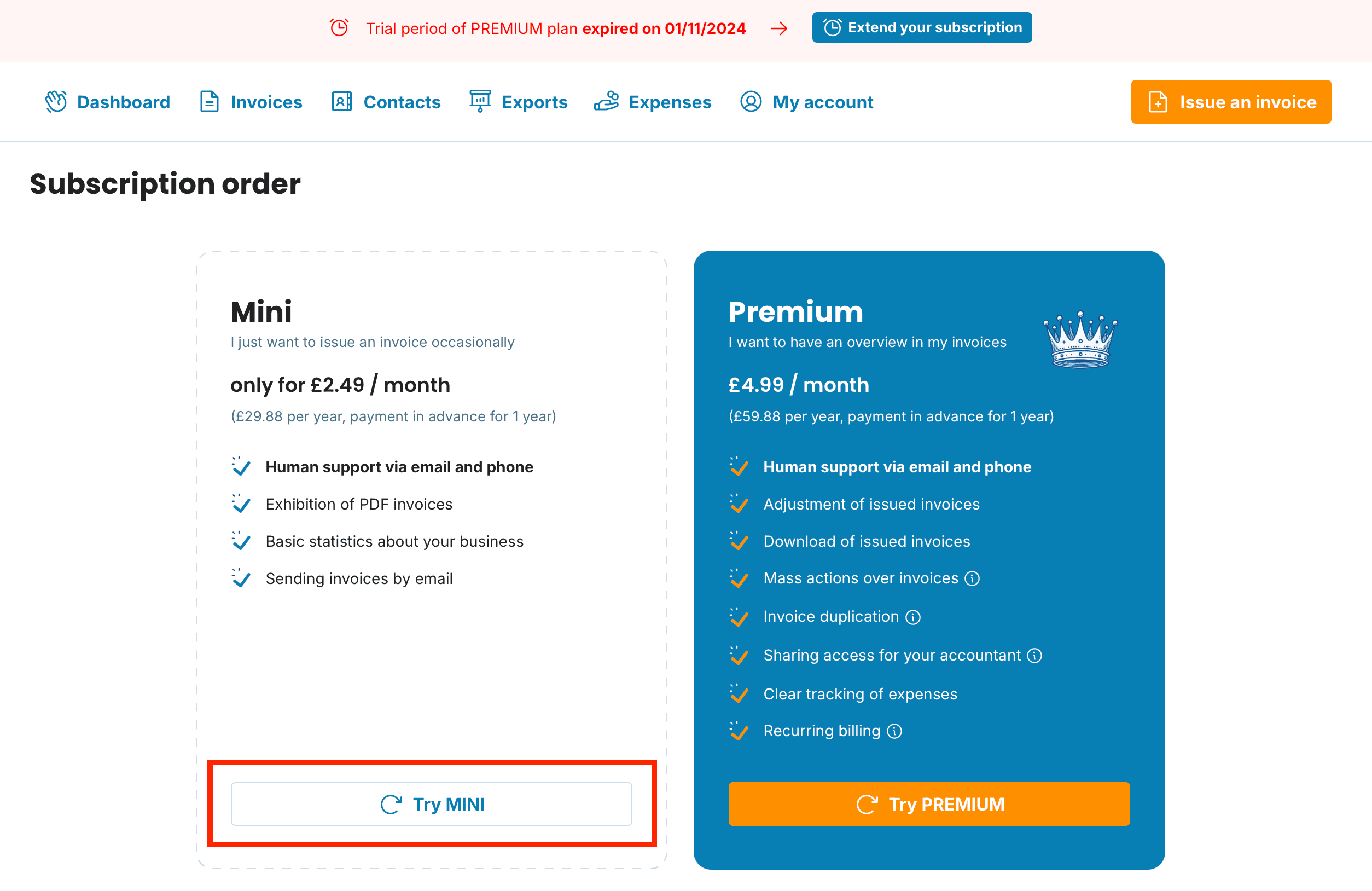
You can pay by credit card.
And that's it! You can continue to issue and send invoices. However, access to editing previously issued invoices under the PREMIUM plan will be lost.

Were you a PREMIUM subscriber, tried the MINI plan, and would like to return to the PREMIUM plan? Once you change back to PREMIUM, features will be available even in invoices created within the MINI plan.